

Getting Started
Quickstart
Send your first email with the Notideus API in five minutes.
1. Prerequisites
- A Notideus account. Creating an API key is dashboard-only — sign in at notideus.io and open API keys.
2. Create an API key
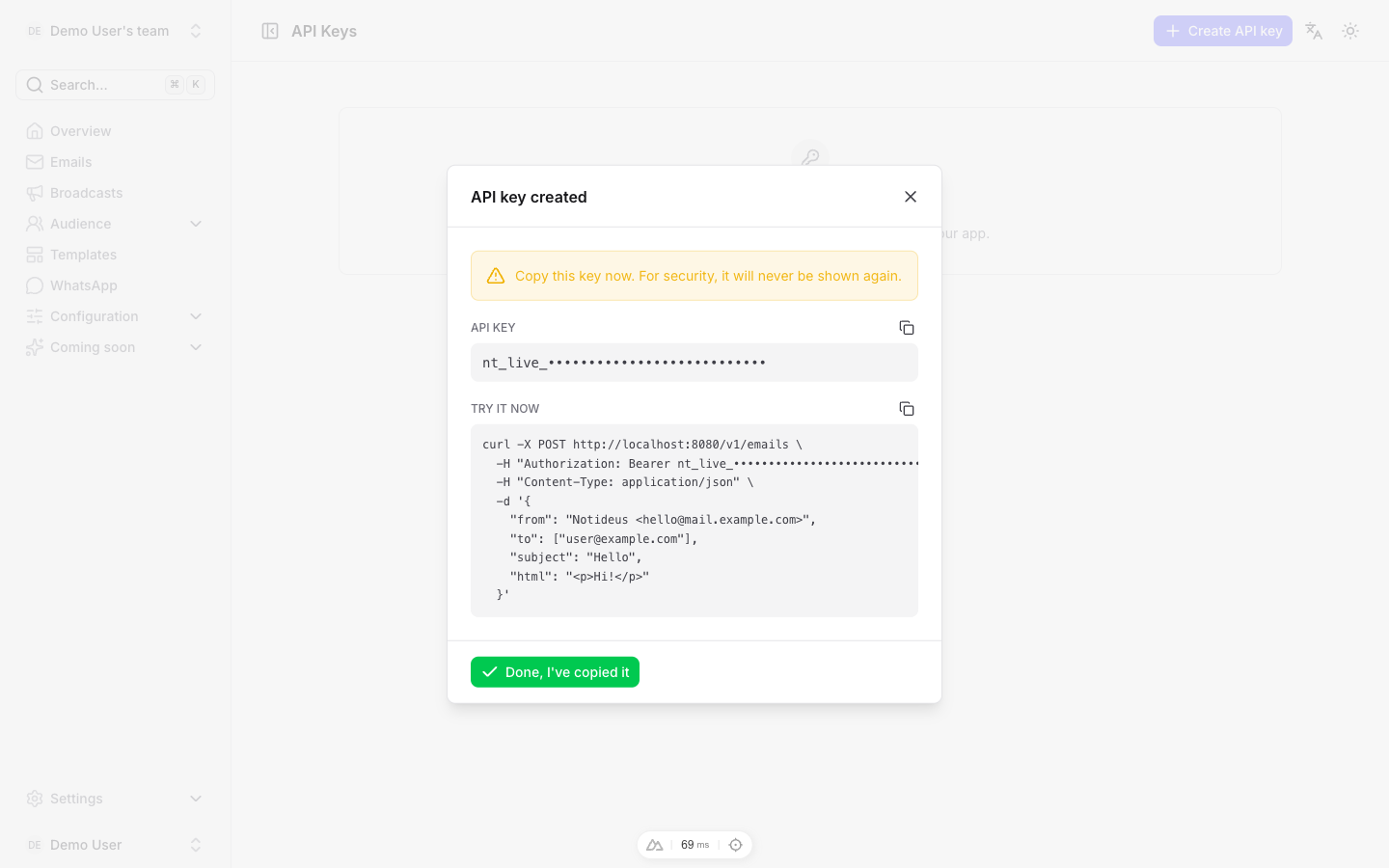
- In the dashboard, click Create API key.
- Give it a name and pick its scopes — for this quickstart,
emails:sendis enough. - Copy the secret immediately. It is shown exactly once: the dashboard keeps only a sha256 hash of it, and from then on displays just the prefix.
3. Send an email
Install the official SDK and put the secret in an environment variable:
npm install notideus
# or: composer require notideus/notideus-php
export NT_KEY="nt_live_…"
import { Notideus } from 'notideus';

const notideus = new Notideus(process.env.NT_KEY);

await notideus.emails.send({
  from: 'Notideus <noreply@demo.dev>',
  to: ['jane@example.com'],
  subject: 'Welcome to Notideus',
  html: '<p>Hi Jane,</p><p>Your account is ready.</p>',
  tags: ['welcome'],
  idempotency_key: 'docs-quickstart-1'
});
<?php
require 'vendor/autoload.php';

$notideus = new Notideus\NotideusClient($_ENV['NT_KEY']);

$notideus->emails()->send([
    'from' => 'Notideus <noreply@demo.dev>',
    'to' => ['jane@example.com'],
    'subject' => 'Welcome to Notideus',
    'html' => '<p>Hi Jane,</p><p>Your account is ready.</p>',
    'tags' => ['welcome'],
    'idempotency_key' => 'docs-quickstart-1',
]);
curl -X POST https://api.notideus.io/v1/emails \
  -H "Authorization: Bearer $NT_KEY" \
  -H "Content-Type: application/json" \
  -d '{
    "from": "Notideus <noreply@demo.dev>",
    "to": ["jane@example.com"],
    "subject": "Welcome to Notideus",
    "html": "<p>Hi Jane,</p><p>Your account is ready.</p>",
    "tags": ["welcome"],
    "idempotency_key": "docs-quickstart-1"
  }'
Returns 201 Created with the stored email row:
{
  "id": "01a0a11c-188e-7c9e-9b69-753fcb4c8d0d",
  "team_id": "00000000-0000-0000-0000-000000000001",
  "domain_id": "01a0a118-2c7b-7da6-aa31-ceb20daf80c6",
  "template_id": null,
  "from_address": "Notideus <noreply@demo.dev>",
  "to_emails": ["jane@example.com"],
  "subject": "Welcome to Notideus",
  "html": "<p>Hi Jane,</p><p>Your account is ready.</p>",
  "size_kb": 0.04,
  "tags": ["welcome"],
  "status": "queued",
  "idempotency_key": "docs-quickstart-1",
  "created_at": "2026-09-14T18:09:28.206638Z",
  "requeued_at": null,
  "ses_message_id": null,
  "broadcast_id": null,
  "contact_id": null,
  "unsubscribe_token": null
}
Two fields matter most right now: id uniquely identifies this email, and status is queued — it is picked up for delivery from there.
4. Idempotent retries
Networks fail. If the request above times out, you can safely re-send it with the same idempotency_key: the API detects the stored row and returns it unchanged — no re-render, no merge. The replay echoes the original stored row with 200 instead of 201, and the same id:
{
  "id": "01a0a11c-188e-7c9e-9b69-753fcb4c8d0d",
  "team_id": "00000000-0000-0000-0000-000000000001",
  "domain_id": "01a0a118-2c7b-7da6-aa31-ceb20daf80c6",
  "template_id": null,
  "from_address": "Notideus <noreply@demo.dev>",
  "to_emails": ["jane@example.com"],
  "subject": "Welcome to Notideus",
  "html": "<p>Hi Jane,</p><p>Your account is ready.</p>",
  "size_kb": 0.04,
  "tags": ["welcome"],
  "status": "queued",
  "idempotency_key": "docs-quickstart-1",
  "created_at": "2026-09-14T18:09:28.206638Z",
  "requeued_at": null,
  "ses_message_id": null,
  "broadcast_id": null,
  "contact_id": null,
  "unsubscribe_token": null
}
Retried sends never double-send or count twice against your quota. See Idempotency for key choice and scope rules.
What's next
- Sending batches — up to 100 emails in one call, with per-item results.
- Syncing contacts — keep your audience in sync with bulk upsert.
- API reference: emails — every field of the send endpoint.